
With the growing popularity of contactless networking, many professionals/ businesses are now switching to digital business cards to make stronger connections and leave a modern impression. Making smart card is very simple and can be done in just a few steps using online tools or digital business card platforms.
In this guide, you can understand how to create digital business card quickly and effectively. So that you can share your details easily and build better professional connections. 🚀
How to Create a Digital Business Card like a Pro?
Creating a digital business card is a modern and eco-friendly way to share your professional information seamlessly. With platforms like Let’s Connect Card, the process is straightforward, customizable, and designed for maximum networking impact. Here’s a step-by-step guide to help you create your own interactive, NFC-enabled business card.
1. Choose the Right Platform
Begin to Create Digital Business Card by selecting a reliable provider that offers high-quality NFC and QR code business cards. Let’s Connect Card provides fully customizable options for individuals, teams, and businesses across various industries.
2. Select a Professional Card Design
Browse through our exclusive design collections, including Basic, Silver, Gold, Diamond, and Platinum tiers – each offering unique aesthetics and premium finishes. Your choice should align with your personal brand or company identity.
3. Customize Your Information
Once you’ve chosen your design, add your professional details:
- Full Name: Display your name prominently for easy recognition.
- Job Title: Clearly define your expertise or role.
- Contact Information: Include your phone, email, and other communication channels.
- Company Logo: Upload your brand logo to strengthen brand recall.
- Social Media Profiles: Add links to LinkedIn, Instagram, YouTube, and other professional platforms. For example, our LinkedIn Business Card is perfect for career networking.
4. Incorporate Interactive Elements
Enhance your digital business card’s functionality with interactive features:
- NFC Technology: Enable tap-to-share on NFC-compatible devices.
- QR Code: Generate a QR code that links to your digital profile, portfolio, or website.
5. Review and Finalize
Preview your digital business card to ensure accuracy and visual appeal. Adjust colors, fonts, and layouts to perfectly match your brand identity.
6. Place Your Order
Proceed to checkout and choose from single or bulk ordering options. LetsConnectCard offers worldwide shipping, ensuring you can start networking smarter in no time.
7. Share Your Digital Business Card
Once you create digital business card online, share it effortlessly:
- In Person: Tap your NFC card on a smartphone or let others scan your QR code.
- Online: Add your card link to email signatures, social media bios, and virtual meeting profiles.
Bonus Tips to Design & Create Custom Business Cards
Here are some additional tips to create digital business cards online. It is not mandatory however these tips will help you make your card more unique, and professional.
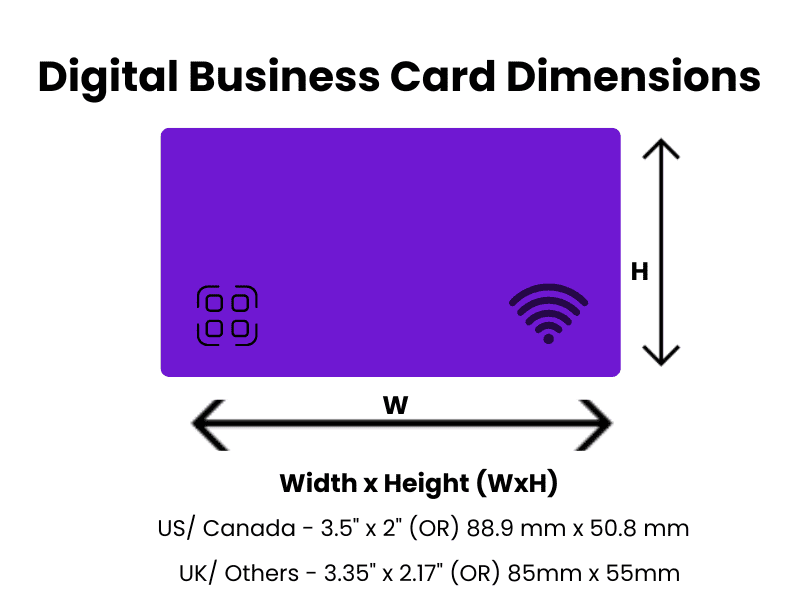
1. Digital Business Card Dimensions
Choose the standard business card size based on your Country. These sizes can be suggested by considering the standard wallets and holders. There is a slight difference in the country wise Digital business card sizes. It might be as follows:
-
- US (United States) and Canada prefer 3.5″ x 2″ inches Or 88.9 mm x 50.8 mm.
- All other countries like UK or Europe prefer using 3.35″ x 2.17″ Or 85mm x 55mm
2. Business Card Template Selection
Choosing the right digital business card template/ design is an important step when creating a professional and attractive card. A good template helps you design a card quickly while maintaining a clean and professional look that represents your brand/ professionalism.
3. Using Upgraded Technologies – NFC Tap & QR Code
To upgrade your networking, use the Modern digital business card techniques such as NFC (Near Field Communication) or QR codes. This will help for the contactless sharing and instant networking.
4. Consider Smart Digital Card Thickness
People always prefer slim cards, especially while enabling NFC technology or QR codes, it’s good to consider the card thickness. It effects its durability, appearance, and how comfortably it fits in wallets or card holders.
Most digital business cards are designed to be slightly thicker than the traditional paper cards because they may also embedded with NFC chips or other technology components. Well-balanced thickness ensures the smart card remains strong, or long-lasting without feeling bulky.
Typical Digital Business Card Thickness is 30 mil (0.76 mm)
5. Smart Card Material Compatibility
Most of the smart digital business cards made from materials like PVC, metal, durable plastic. Before buying Digital business cards online, you should check if the material is compatible to hold NFC chips/ provides better protection.
How to Make a Digital Business Card? – Conclusion
By following these steps, you can create a personalized, professional, and efficient digital business card that reflects your brand and helps you connect effortlessly. Embrace the future of networking with Let’s Connect Card – where technology meets meaningful connections.